Most businesses that start automating pick the task that annoys someone the most. That is rarely the task that costs the most, and it is often one that should not be automated at all.
Automation is most useful when it removes repetition, prevents avoidable mistakes, and moves information without someone carrying it. It is least useful when it is added on top of a process nobody has examined. This is the way we decide which business processes to automate first, and which to leave alone.
Start by finding where a person is the integration
The best candidates are rarely listed anywhere. They live in the gaps between systems, done by someone who has been doing them so long they no longer think of them as a task. Look for:
- The same task done manually every week.
- Information copied from one system into another by hand.
- Documents that arrive in a format nothing downstream can read.
- Reports that need exports from several tools before they exist.
- An existing automation that breaks whenever something unusual happens.
Write each one down with who does it, how often, and how long it takes. That list is the starting point, not a backlog.
Four questions for every candidate
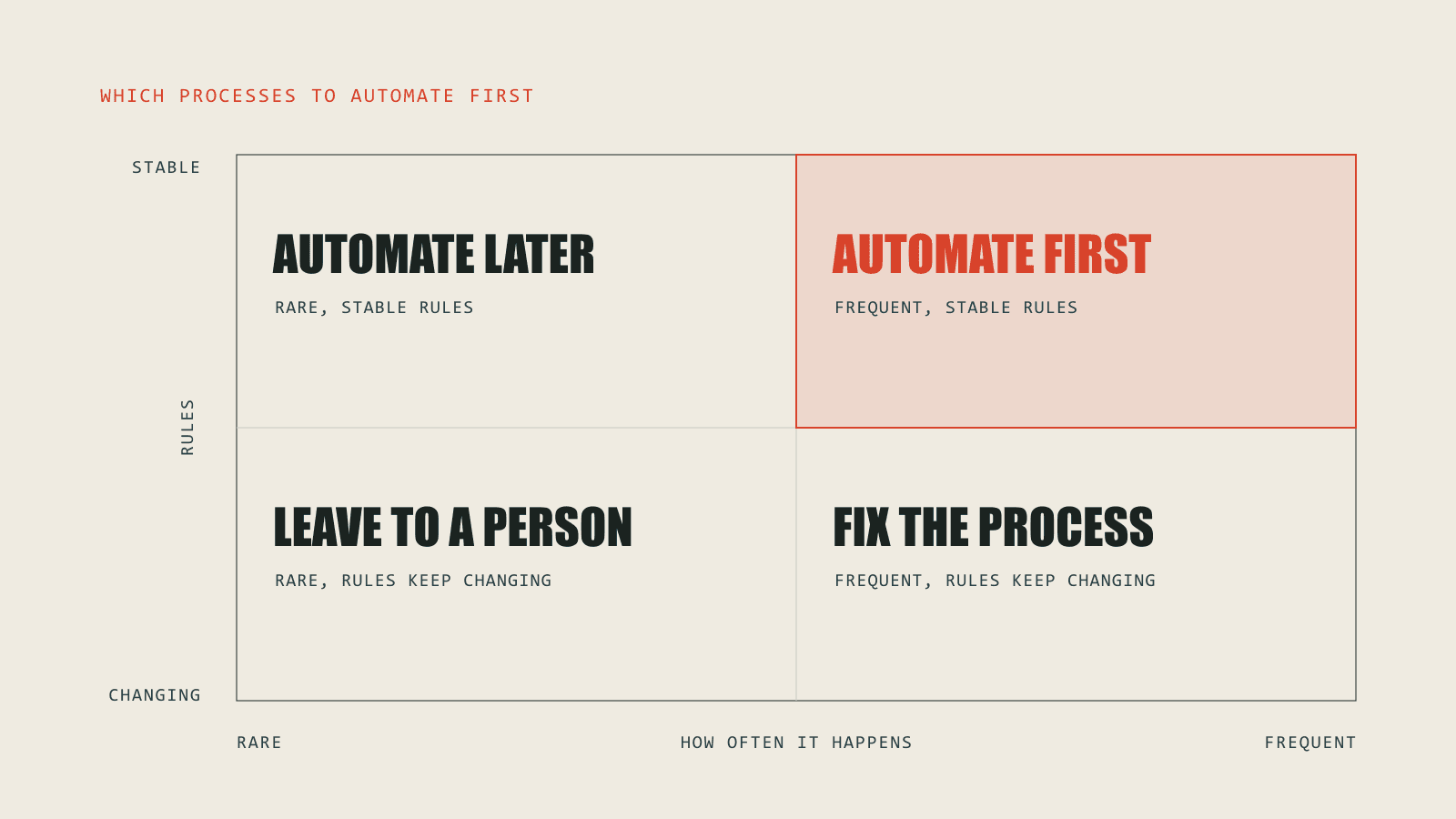
- How often, and how long? Multiply how many times a month the task happens by the minutes it takes. A two-minute task done a thousand times is worth more than a two-hour task done once a quarter.
- Are the rules stable? If the same input always leads to the same output, the task can be automated with fixed rules. If the rules change every month, automating them means rebuilding the automation every month.
- Can a machine read the input? Structured data from a form or an API is easy. Emails, PDFs and scanned documents need a language model to extract and classify them, which is possible but needs more care and a review step.
- What does a mistake cost? A wrong tag on a support ticket is cheap. A wrong figure on a supplier payment is not. The higher the cost of an error, the more the automation needs checks, logging and a person to approve the exceptions.
A worked example: supplier invoices
A business receives 400 supplier invoices a month by email. Someone opens each one, types the supplier, amount and due date into the accounting system, and files the PDF. It takes about 6 minutes an invoice.
That is 40 hours a month. At $30 an hour, it costs about $1,200 a month, before counting the typing errors and the late payments they cause.
Automated with 4 steps (read the email, extract the fields, create the bill, file the document), the same work costs between $16 a month on Make and $74 on Zapier in platform fees. The person still reviews the invoices the automation is unsure about, which is a few minutes a day rather than most of a week.
The rules are stable, the volume is steady and a mistake is expensive enough to justify a review step. It scores well on all four questions, which is why invoice processing is so often the first thing worth automating. The automation cost calculator runs the same comparison for your own process.
Fixed rules or AI?
Most automation does not need AI. Moving a new order into a spreadsheet, creating a contact when a form is submitted or posting a message when a payment fails are fixed rules, and fixed rules are cheaper, faster and easier to test.
AI earns its place where the input is language: reading a document, deciding which team an email belongs to, drafting a reply, pulling the fields out of an invoice that does not follow any template. There, a model such as Claude or GPT does the reading, and the rest of the workflow stays rule-based around it.
What to leave alone
- Tasks that happen rarely. If it takes longer to build and maintain than it would take to do by hand for the next two years, do it by hand.
- Judgment calls. Pricing an unusual job, handling a complaint, approving an exception. Automate the preparation and leave the decision to a person.
- Processes that are still changing. Automating a process before it settles locks in a version the business is about to abandon.
- Broken processes. Automating a broken process makes it fail faster and more quietly. Fix it first.
Build it to fail safely
Every automation will eventually meet an app that is down, a record that is missing, or a job that runs twice. The difference between a good automation and a liability is what happens next. Before building, decide where errors go, who is told, and how a failed run can be retried without creating duplicates. An automation that fails loudly is an inconvenience. One that fails silently is a problem discovered weeks later.
How we decide what to automate
Our work starts with a conversation about how the work happens now and where it stops fitting. No specification required. Then we map the process, identify what is worth changing, and say plainly what we would leave alone. Only then do we propose a scope: the platform, the architecture, and what the system will and will not do.
We build workflow automations and custom AI agents on Make, Zapier, n8n, Claude and the OpenAI API, and connect the systems they depend on. The Rankid case study shows the same line drawn inside a product: the system reads and ranks every document, and the decision stays with a person.